Redialing your list without re-calling contacts you've already reached (CSV)
Last updated: September 16, 2026
If you're working from an uploaded list (CSV) rather than a CRM or a sequencer, your list can refresh each time you reload it, which sometimes pushes contacts you've already called back to the top. Two filters solve this: Not reached yet and Days since last dial.
Who this is for: Anyone dialing off a CSV-uploaded list without a connected CRM. Sequencer users already get this behavior built into their cadence.
How to set it up:
Open your list and click Filters.
Set the first filter to Not reached yet → Is true. This excludes anyone already marked as contacted.
Click Add filter, then set the second filter to Days since last dial → Greater than or equal → enter the number of days (e.g.,
1for a daily cooldown).Click Done.
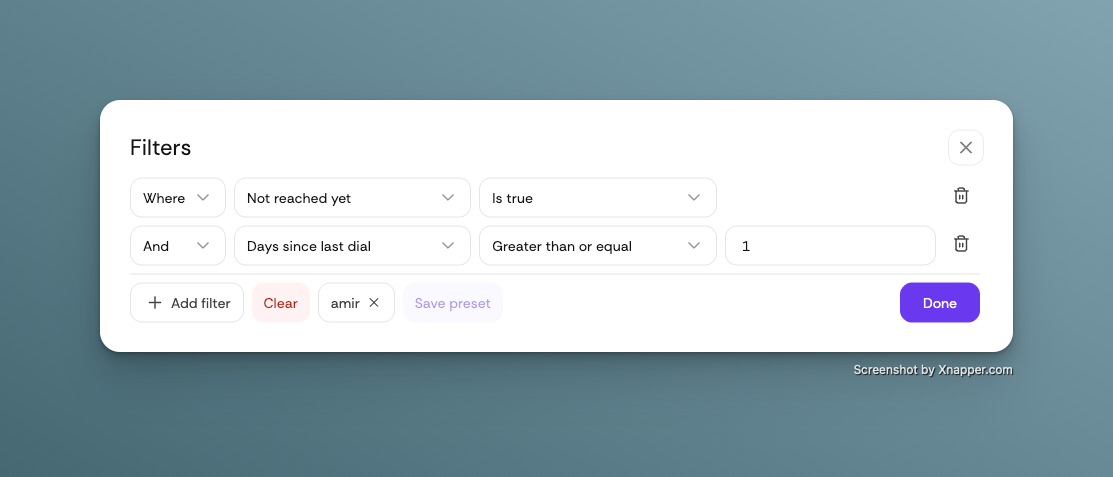
💡 Tip: Click Save preset once your filters are set so you can reapply them instantly next time, without rebuilding them.
With both filters applied, your list will only surface contacts who haven't been reached yet, or who were last dialed further back than the interval you chose.
Still running into contacts repeating on your list? Reach out to support and we'll take a closer look at your setup.