How to Use: Auto-Pick Feature
Last updated: April 22, 2026
Intelligent Number Selection & Smart Rotation
The Auto-Pick Feature is a powerful enhancement designed to simplify the way users add phone numbers across multiple area codes. With one click, the system intelligently selects the best available numbers — automatically handling fallbacks and enabling Smart Rotate to optimize availability and reduce manual workload.
🚀 Key Benefits
Effortless number discovery: Automatically finds top phone numbers across different area codes without manual searching.
Smart availability fallback: If a desired number isn’t available, the system selects the next best alternative.
Bulk selection with confirmation: Users can review and confirm multiple suggested numbers before adding them.
Auto-enabled Smart Rotate: Ensures numbers cycle automatically without additional configuration.
Time savings: Reduces manual number entry and configuration — previously a repetitive task — with one seamless workflow.
🧠 How It Works
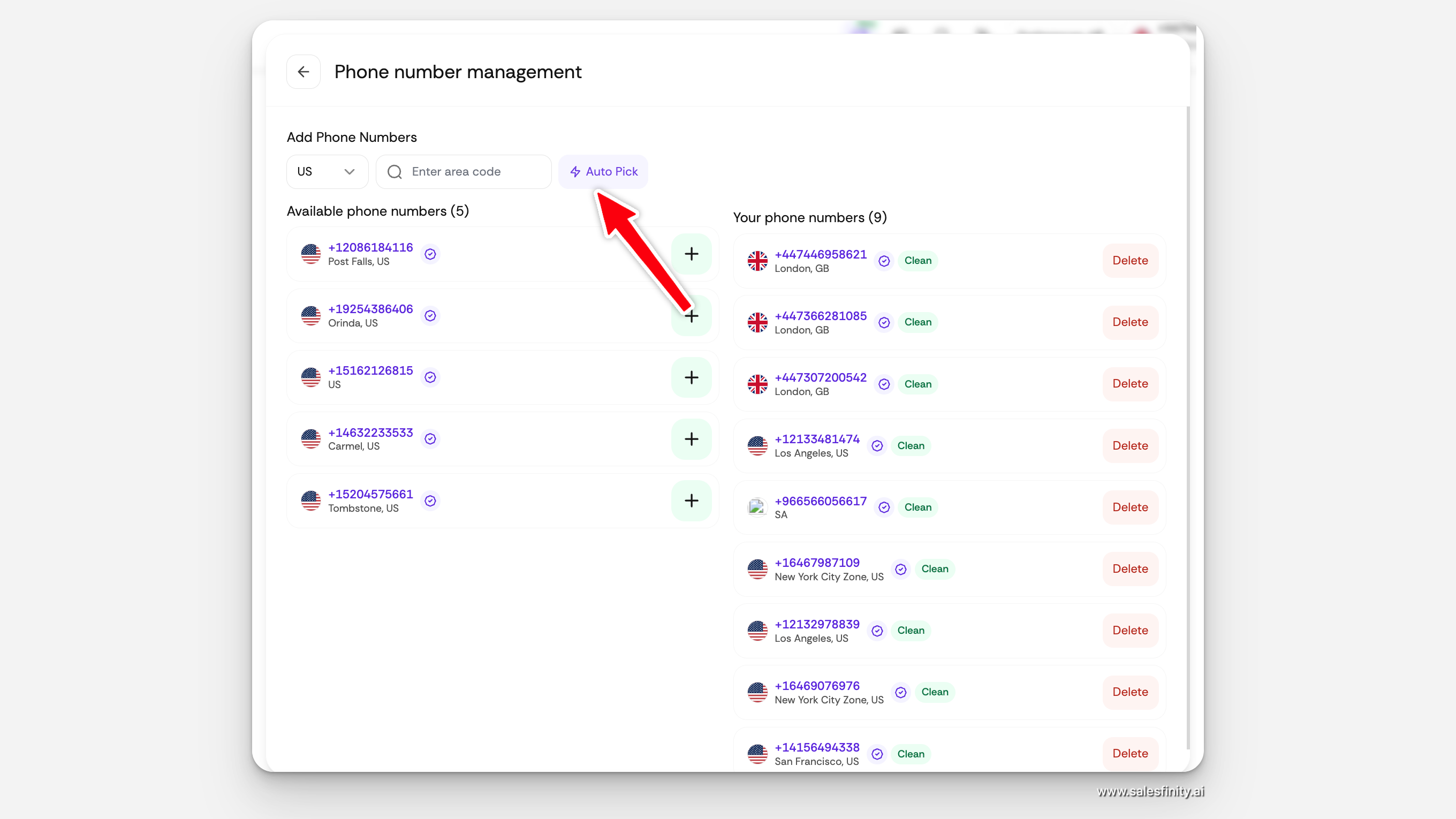
1. Navigate to Management
Access the Manage Numbers section in settings.
Locate and click the Auto-Pick button to initiate number selection.
2. Intelligent Selection Process
Upon activation, the Auto-Pick engine:
Searches for available numbers across selected area codes.
Evaluates fallback options if primary choices are unavailable.
Compiles a list of recommended phone numbers.
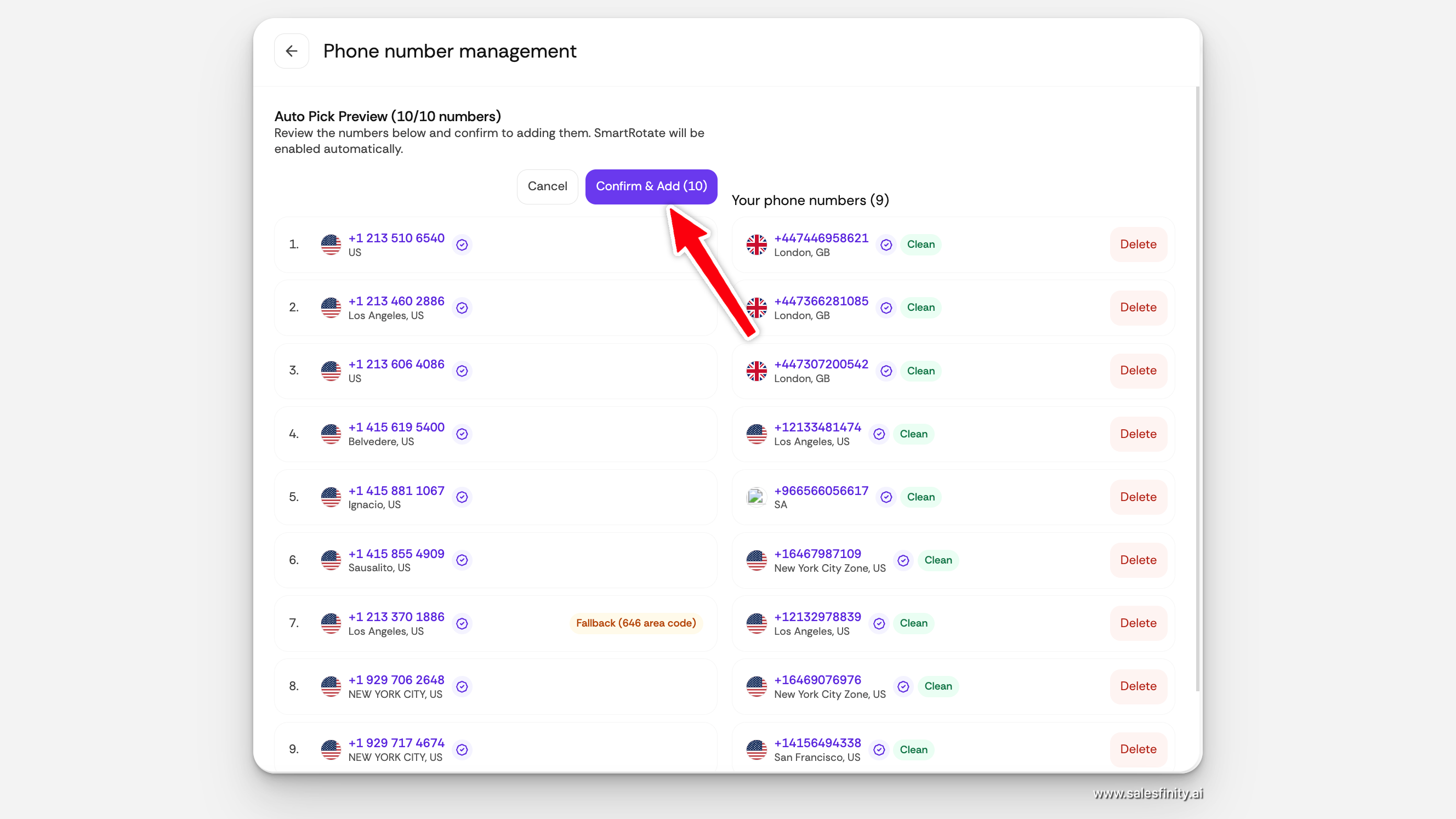
3. Review and Confirm
A confirmation prompt displays the suggested numbers.
Users review and confirm to proceed with adding them.
4. Automatic Addition & Smart Rotate
Once confirmed:
Numbers are added instantly.
Smart Rotate is enabled automatically — eliminating the need for further manual setup
🧩 Feature Highlights
Feature | Benefit |
Automated Selection | Eliminates manual number hunting |
Fallback Area Codes | Ensures availability if preferred codes are exhausted |
Smart Rotate Enabled | Improves usage distribution & uptime |
Bulk Confirmation | User retains control before addition |
Instant Add | Reduces setup time, accelerates workflows |
🎯 Tips for Best Results
Use Auto-Pick when provisioning large sets of numbers.
Combine with area code preferences for regional targeting.
Review suggested numbers before confirmation for quality control.
❓ Frequently Asked Questions
Q: Can I choose how many numbers Auto-Pick selects?
A: At present, the feature selects a predefined number and offers a confirm prompt before adding.
Q: What happens if all numbers in a given area code are unavailable?
A: Auto-Pick automatically selects the best fallback numbers from alternate codes — no manual search needed.
Q: Does Smart Rotate start automatically?
A: Yes — Smart Rotate is enabled by default when numbers are added via Auto-Pick.